
No products selected.

 DW Extensions
- Car Rental System
- Survey Manager
- Maps Inserter for Google Maps
- Advanced Form to Email PHP
- Advanced Form to Email ASP
- Posts Carousel
- Comments Inserter Widget for Facebook
- Mobile Optimize
- Photoshow
- Smart List
- Light Date Picker Calendar
- Touch OnOff
- Touch Button
- Light Edit
- Advanced Form to Excel PHP
- Text Tools
- Advanced Database Relational List
 Free Tools
 Another Resources
 Product Info
Demo / Video / Faq
 Instant Download

Paypal: You will return from Paypal to a direct download page. A copy of your personal donwload link will be sent to the email address used for payment.
Be sure to check also your spam/bulk mail folder.

Touch OnOff
Apple fans have always liked the checkbox display mode controls in the iPhone, and that often stimulates them to incorporate similar features into their own websites. The checkboxes are controls that have two states, selected or not; in the iPhone they are shown as an "On/Off" switch. For all developers and web enthusiasts who admire iPhone, we have created Touch OnOff, a checkbox whose design and behavior is based on the similar controls used by the iPhone.
Touch OnOff has been developed as an extension for Adobe Dreamweaver, facilitating its insertion into webpages. Touch OnOff stands out because of its simplicity and its intuitive setup window.
FEATURES
- The Touch OnOff's visual aspect is simple and sleek
- Can replace the common checkbox in forms by a more semantic and aesthetic control
- Is possible to set ON the On/Off element by default
- Has been developed as a Dreamweaver extension, that fact simplifies insertion and does not require any further web programming knowledge for its use.
- Unobtrusive
REQUIREMENTS
The requirements for using Touch OnOff are minimal; you only need Adobe Dreamweaver MX 2004 or later versions (including Dreamweaver CS4, CS5, CS6, CC ...).
INSTALLATION
To install Touch OnOff, like any other Adobe Dreamweaver extension, you need to use the Adobe Extension Manager, which is distributed with Dreamweaver. Run the "Install" option in Adobe Extension Manager and enter the path to the .mxp file.
Once the extension is installed, the Touch OnOff can be accessed through menu
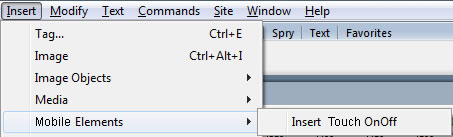
Fig. 1 Menu option
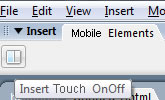
Fig.2 Insert bar option
Use
To insert Touch OnOff into a website you will need to load the desired webpage in editor mode in the Adobe Dreamweaver. Then place the cursor at the location where you want to insert Touch OnOff and click "Insert Touch OnOff" either on the toolbar or the "Insert" menu. Touch OnOff will show a setup window described below.
Interface
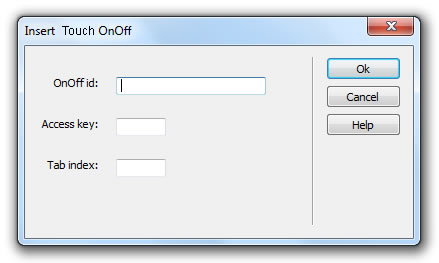
OnOff id: Enter the element ID; this must be unique within the website.
Access key: Enter a "letter" that will allow a shortcut to the button. In Windows is done by hitting Alt+"letter"; in Macintosh Ctrl+"letter" when in a browser.
Tab index: Enter a number for the tab order.
Remember that at the end, both the modified web page and the directory structure generated by the extension should be updated on your Web server.
Instant Download
$9.99
Paypal: You will return from Paypal to a direct download page. A copy of your personal donwload link will be sent to the email address used for payment.
Be sure to check also your spam/bulk mail folder.

